Now in early access · iOS

Every rig signal.
One clear decision.

An AI assistant that turns your WITSML feeds, reports, and offset wells into answers you can act on. Every one traces back to its source.

Ask in plain English, like “why did ROP drop overnight?” You get back an answer that cites the exact reports, channels, and offset wells behind it. Your team checks the evidence, not just the bot.

  • Answers tied to the source data
  • Early pattern detection across wells
  • Offset-well knowledge surfaced when it matters

Fleet Dashboard

Reads the operating record your team already keeps

WITSML StreamDaily Drilling ReportMud ReportMud LogDirectional SurveysOffset Wells DBWITSML StreamDaily Drilling ReportMud ReportMud LogDirectional SurveysOffset Wells DB
Signal loss

The answer is already in your data. Your team just can't reach it in time.

Drilling teams do not lack data. They lack one operational memory that understands how reports, live streams, vendors, and offset wells explain each other.

PDF

Morning report

buried in an inbox

XLSX

Mud report

re-keyed by hand

WITSML

Rig feed

nobody watching at 3 a.m.

Database

Offset wells

lessons never resurface

Operational drag
  • 01

    A warning appears in one system while the context sits in another.

  • 02

    Engineers spend the first hour reconstructing yesterday instead of deciding today.

  • 03

    Patterns become obvious only after time, cost, or safety margin is already lost.

The shift

From manual reconstruction to a live operational brief.

Less time hunting for context, more time deciding what the rig should do next.

Without TallyBook

Fragmented morning

  • Open five portals before the morning call.
  • Compare PDFs, spreadsheets, WITSML exports, and vendor dashboards by hand.
  • Explain variance after the trend has already become expensive.
  • Send another spreadsheet so the team can agree on the same version of events.
With TallyBook

Decision-ready insight

  • Ingest live feeds and unstructured reports automatically.
  • Tie each answer to source rows, documents, and offset wells.
  • Surface the operational reason behind each variance.
  • Give every role the same evidence-backed insight.
Example answer
“ROP stepped from 38 to 96 ft/hr at the same WOB and RPM, and MSE dropped with it: a clean drilling break, not a bit problem. It lands within 20 ft of the mud log's projected next top. Loving-2 and Delaware-2 both broke at this same depth and logged a gas show right at the top.”
Backed byDrilling time sheet · last 300 ftMud log · projected top + gasOffsets · Loving-2, Delaware-2
The process

From raw drilling data to decision in minutes.

Field data enters in its native form, gets structured into operational context, and exits as an answer the team can act on.

Step 01

Ingest

Connect WITSML feeds, read PDF reports, collect emails, and ingest sensor data.

Step 02

Process

Clean messy data, structure unstructured text, normalize units, and correlate sources.

Step 03

Analyze

Flag activity and trends that diverge from offsets and plan for an engineer to confirm, calibrated per rig during the pilot.

10110
01001
11100
00111
10010
Step 04

Deliver

Deliver daily briefs, real-time alerts, and cited answers the team can act on.

Features

The whole operation, on your phone.

Five real screens that turn scattered drilling data into decisions, from the fleet at a glance down to a single connection.

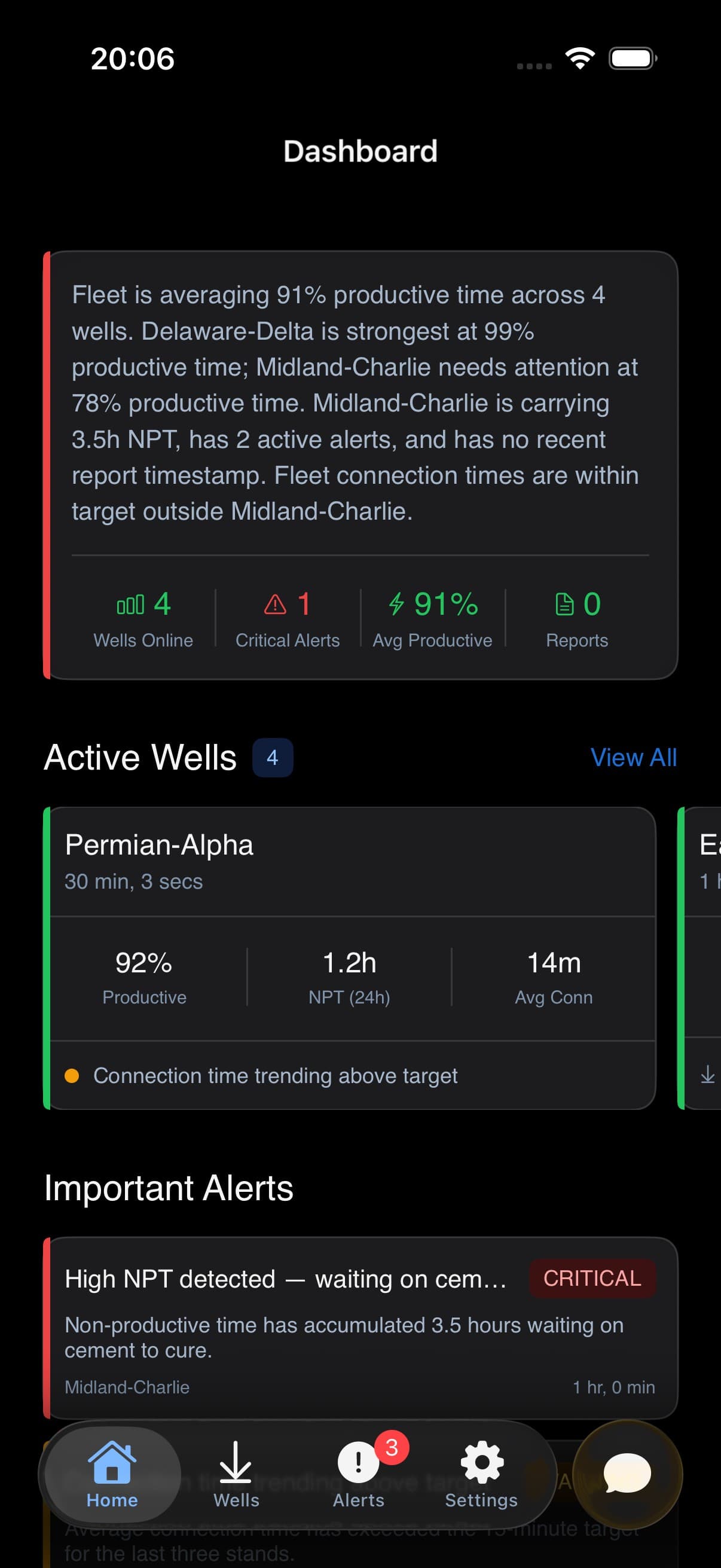
Fleet command center

Open the app already briefed on every rig.

An AI summary of fleet status, your active wells, and the alerts that actually need you, the moment you open the app.

  • AI fleet summary in plain English
  • Active-well carousel with current KPIs
  • Critical alerts pulled to the top
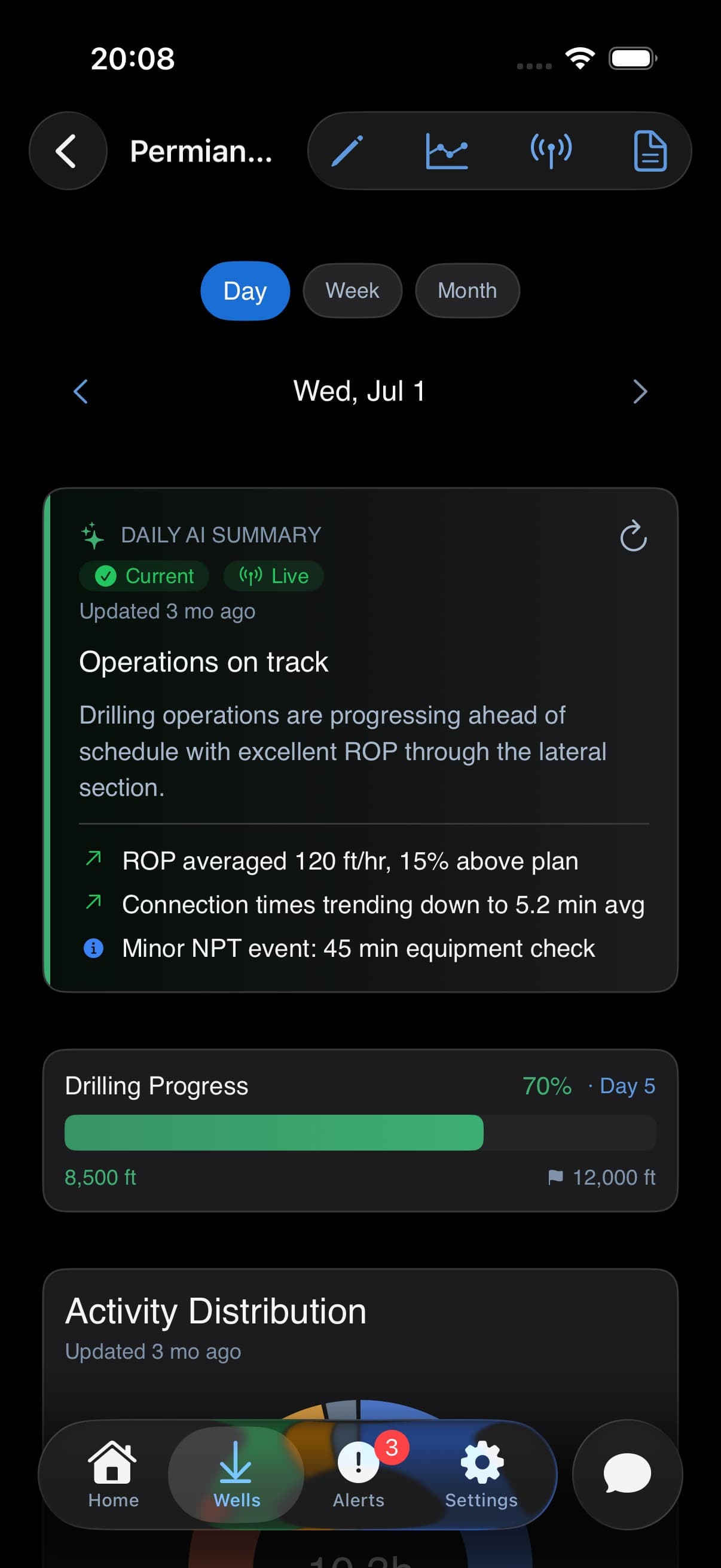
Single-well brief

Know where a well stands without opening five reports.

Depth, time, and activity for one well, reconciled into a single brief, with an AI summary you can trace back to its evidence.

  • Depth vs. target progress
  • NPT and activity breakdown
  • Connection-time and ROP trends
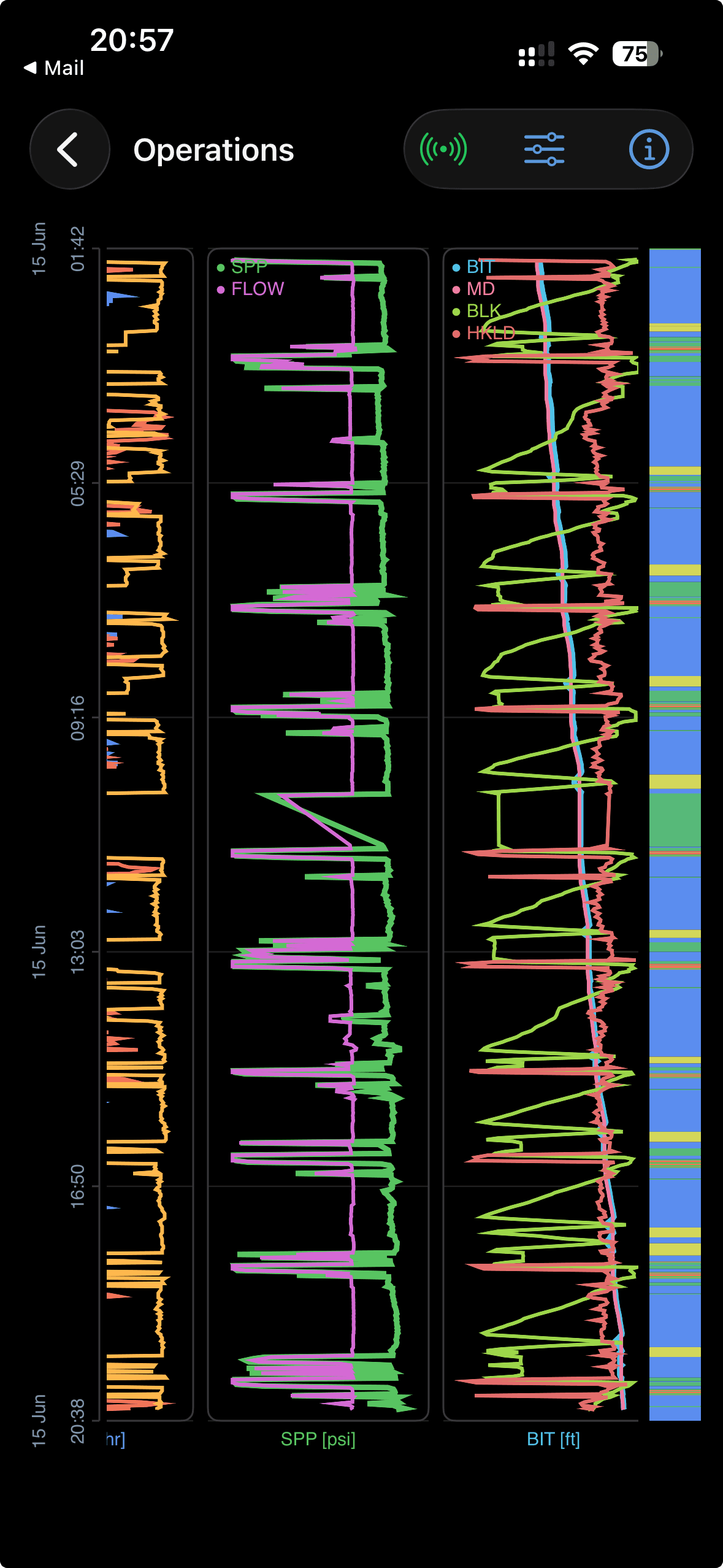
Operations Analysis

Every drilling parameter on one time axis.

ROP, WOB, pressure, and flow on a single time axis, so a slowdown's cause is visible instead of inferred.

  • Synchronized multi-parameter charts
  • Pan and zoom any time window
  • Drill into a single interval
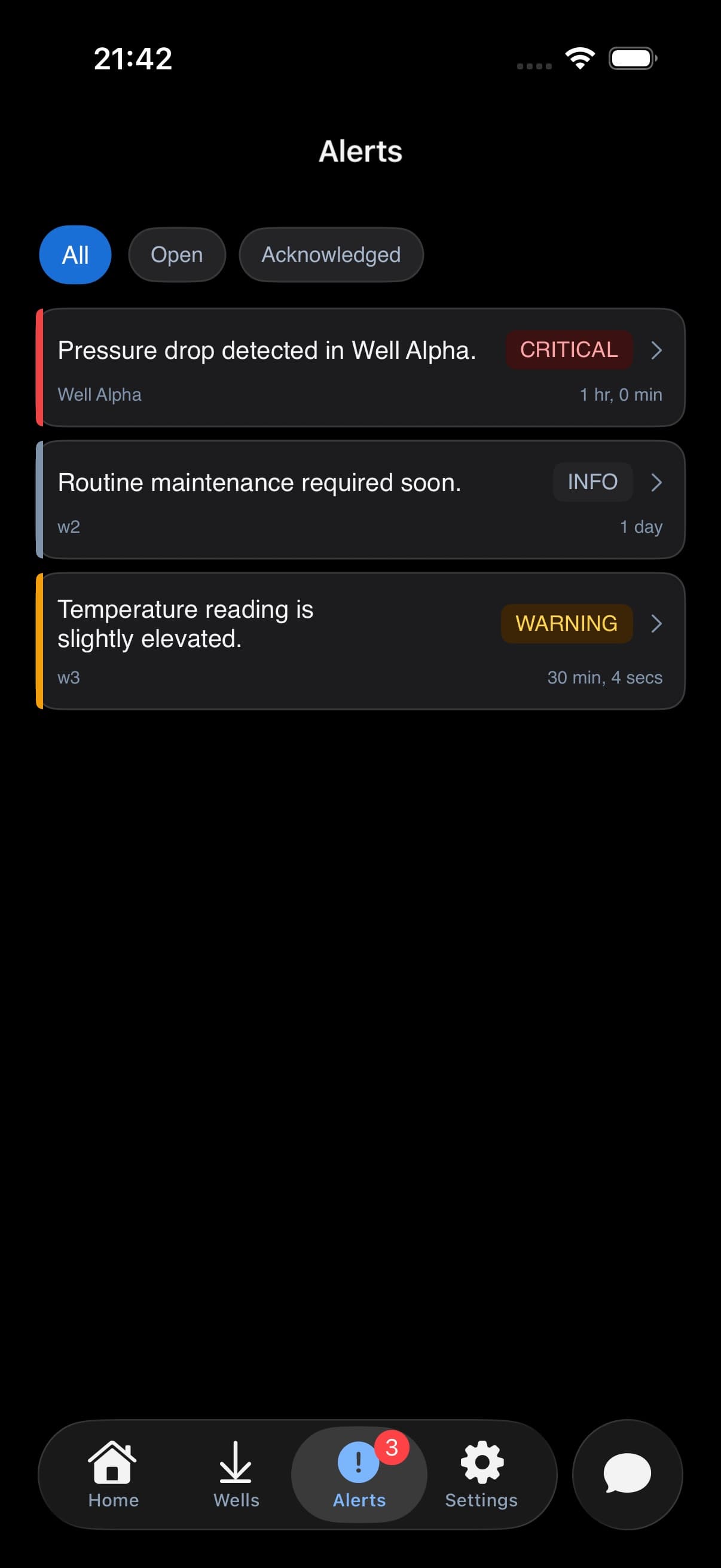
Alert triage

Catch the trend while you can still change it.

The Alerts tab keeps open, acknowledged, and resolved events in one severity-first queue so the urgent item is visible before the next stand.

  • All, Open, and Acknowledged filters
  • Severity, well, and age on every alert
  • Critical events pulled to the top
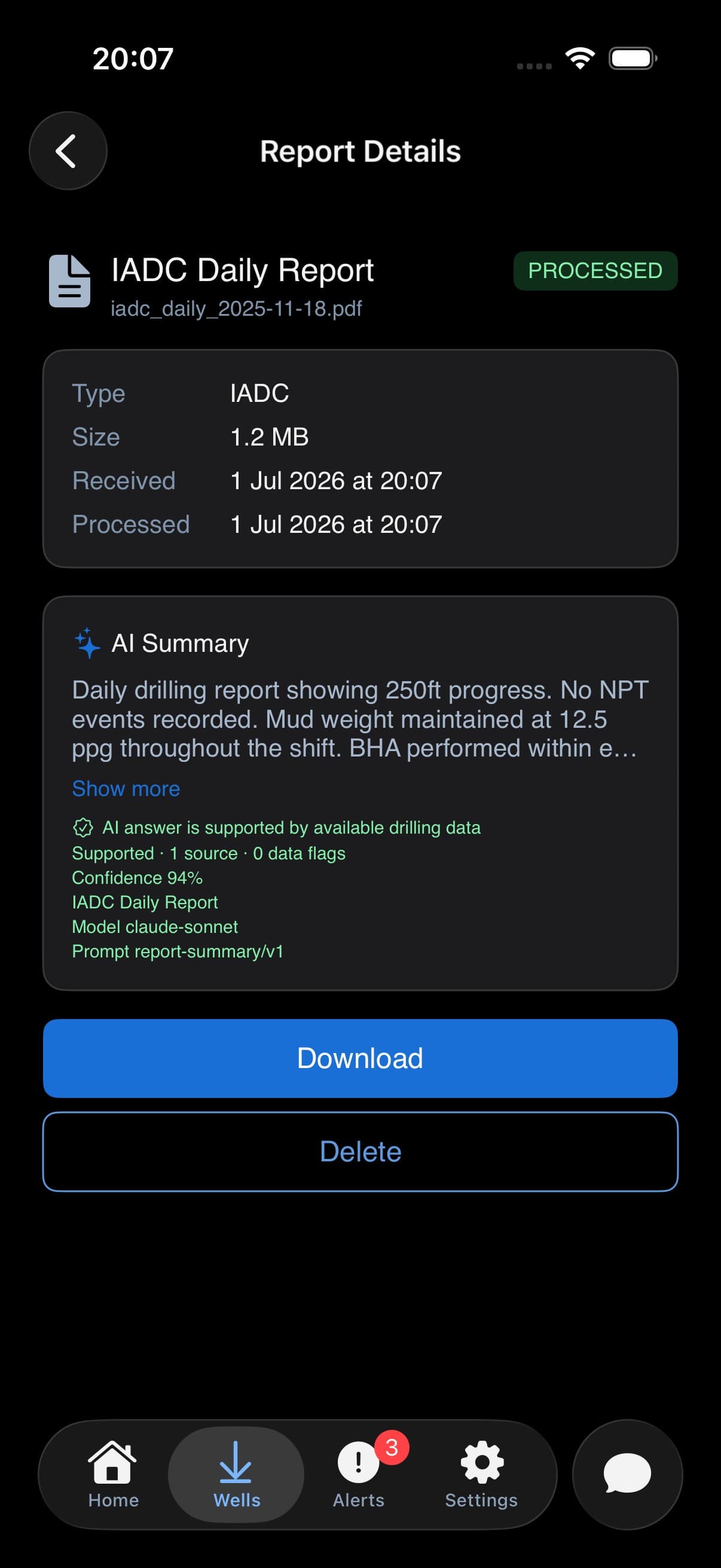
AI report ingestion

Drop in a PDF and get back an answer, not a filing cabinet.

Upload daily reports or CSVs and TallyBook parses, summarizes, and files them, with the source provenance kept intact.

  • PDF and CSV upload, up to 10 files
  • AI summary with provenance
  • Live processing status
Deep dive

Ask one question. See the whole operating chain.

Instead of opening multiple reports and dashboards to understand why the well is behind schedule, ask TallyBook and review the supporting evidence in the same workflow.

Instant correlation

01

TallyBook connects ROP drops with formation data, drilling parameters, and historical offsets automatically.

Root-cause context

02

It explains what changed, what likely caused it, and the evidence behind it. Flagging the delay is the easy part.

Offset intelligence

03

See how the event compares to similar depths, crews, sections, or wells before deciding the next action.

TallyBook · every answer cites its sources

Pilot questions

What TallyBook can support before the first well.

A practical view of file intake, WITSML/ETP, AI modules, private deployment, and security boundaries.

PDF and CSV upload
WITSML/ETP ingestion
Source-backed AI
Dedicated deployment path

TallyBook brings daily drilling reports, PDF and CSV uploads, email-fed report packages, WITSML/ETP streams, alerts, and offset context into one operational view. In the iOS app, direct upload is currently focused on PDF and CSV files.

Early access

Prove it on one well. Expand when the brief earns trust.

Built for operators, drilling engineers, and digital teams who need answers faster, without asking the field to swap tools. Start on one well and keep your current workflow.

How it starts

  1. 1

    Connect one active well or recent section.

  2. 2

    Load reports, WITSML logs, and offset context.

  3. 3

    Review source-backed alerts and daily insights with your team.

Contact

Tell us what slows your team down.

Share the reports, feeds, and questions you need answered faster. We'll take it from there.

Prefer a direct line?

Reach out for demos, partnerships, or early-access discussions. We typically reply within one business day to scope a one-well pilot.

What happens next: we reply within one business day and scope a one-well pilot on a short call. You see your own data in TallyBook before any commitment.

We use the details you submit to respond to your request. See our Privacy Policy for how we handle personal data.